

If you’re looking to save space on your Xbox’s internal storage, chances are you’ve thought about going fully digital. Saves space but digital costs more than going to a store and buying a game, and then you have second hand games where you pay less. But at the end of the day you still have the problem of storage for your xbox. It sounds like a smart way to have more games on demand, but it can be confusing when you try playing certain games and get an error or just can’t launch them at all. I’ll break down exactly why this happens, which games are affected, and what you can do about it.
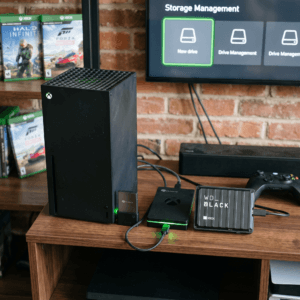
Understanding Xbox Storage Options
Xbox consoles, from the older Xbox One up to the newer Xbox Series X and Series S, let you plug in USB external hard drives for extra storage. For folks running out of space, especially with the massive download sizes of modern games, this is a pretty handy feature.
Not all hard drives work the same way on Xbox. The basics:
- Xbox Internal Storage: This is the built in drive that came with your Xbox. It’s the fastest storage you’ve got and is how you play your games.
- Official Xbox Expansion Card: A superfast plugin card designed for Xbox Series X|S that works just like the main drive for storage and speedy performance.
- External USB Hard Drive: Standard USB 3.0 hard drives or SSDs that you can use for storing most games, backups, and media.
Why Some Xbox Games Don’t Work from an External Drive
The main reason you can’t play certain games directly off an external hard drive comes down to how games are made for newer Xbox consoles. Microsoft requires games built for the Xbox Series X and S to run off the fastest storage possible. This helps them load huge environments quickly, switch scenes without a hitch, and offer things like fast resume without hiccups.
- Newer Games: Any game labeled “Optimized for Xbox Series X|S” (like Halo Infinite or Forza Horizon 5) needs to be installed on either the internal drive or the official expansion card. External hard drives just aren’t fast enough for the advanced tech and speed these games need.
- Backward Compatible Games: Older Xbox One, Xbox 360, and original Xbox games run just fine from an external USB drive since they weren’t built with the newer highspeed requirements.
This approach keeps your gameplay smooth, and gives you a way to still use external drives for the classics or bigger game libraries without cluttering up your main storage.
Quick Guide: Which Games Can (and Can’t) Be Played from an External Hard Drive?
- Playable from External Drive:
-
- Xbox One games (if not optimized for Series X|S)
- Xbox 360 backward compatible games
- Original Xbox backward compatible games
- Not Playable from External Drive:
-
- Any game with the “Optimized for Xbox Series X|S” label
- Games specifically built for Series X|S consoles
If you try to launch a new Series X|S-only game from an external drive, the console will prompt you to move it to internal storage or the expansion card before you can play.
Why Does Xbox Require Series X|S Games to Use Fast Storage?
Series X|S games use technology called “Velocity Architecture,” which is designed to make load times super short and create seamless, open worlds. The internal SSD and the official expansion card are way faster than standard USB drives. Some highlights:
- Instant Load Times: Data can be accessed almost instantly so you spend less time staring at loading screens.
- Fast Travel and Switching: Games that switch quickly between big environments or let you resume instantly need this speed to work as intended.
- Optimized Graphics & Performance: High resolution textures and assets stream in on the without lag.
Even the best USB external drives can’t match the read/write speeds you get from the internal SSD or the official expansion card. So, for the best possible experience with the latest games, Xbox locks playability to those faster drives.
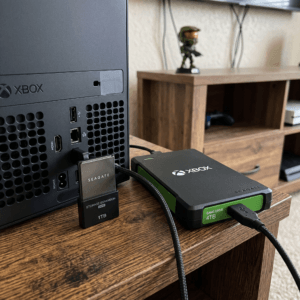
Makes Sense for Storage Management
This system is actually pretty practical. You can move your Series X|S games to an external hard drive when you aren’t playing them. This is great for freeing up space, and it makes swapping your games a breeze. When you do want to play, just transfer the game back to your internal or expansion storage.
This transfer takes way less time than re-downloading a massive game, especially if you have a slow internet connection or data caps. So, you can build a big library of games on your external drives and swap them in and out as needed, giving a big boost to your flexibility.
Common Problems and Confusions
Even people who have used Xbox for a while can run into confusion about how storage works. Here are a few questions I often get:
- “Why can I move, but not play, Series X|S games from my external hard drive?” You’re allowed to store Series X|S games on any drive you want. The restriction is just on launching them, only the internal or expansion card will work for that.
- “What about using an external SSD? Will that work?” While external SSDs are faster than older hard drives, they still fall short of the speed needed for nextgen games. Xbox won’t let you play Series X|S-optimized titles from them for this reason.
- “Can I use my old external hard drive from my Xbox One?” Absolutely! All your Xbox One, 360, and original Xbox games should work just fine from the same external hard drive, even if you upgrade to a Series X or S console.
How to Make the Most Out of Your Xbox Storage
- Keep New Games on Internal or Expansion Card: Put Series X|S optimized games there for the best graphics and minimal load times.
- Store Older Titles Externally: All your Xbox One (not optimized for Series X|S), 360, and OG Xbox games work from USB drives. This is perfect for big library-building and keeping your favourites close.
- Transfer, Don’t Delete: Use your external drives to archive Series X|S games when you’re not playing. That way, you don’t need to re-download them later and you can fast track your playing time.
This combo lets you save your fast storage for the games that require it, while still keeping all your older games within easy reach.
How I Use My Xbox External Drive
I keep my Xbox Series X’s internal storage for the latest titles. Think big games like Halo Infinite, Call Of Duty, or Forza Horizon that show off what the console can do. Everything else, from indie games to the classics I still revisit, stays on my big USB hard drive plugged in the back.
This setup means I’ve always got quick access to my favourites without filling up my main drive. When I want to replay a big Series X|S game I’ve archived externally, I move it back onto internal storage. The transfer is pretty fast, so I’m never left waiting long.
Helpful Terms to Know
- Optimized for Xbox Series X|S: These games use next level features and need fast storage to work properly.
- Expansion Card: A special, fast addon drive that works just like your internal SSD.
- USB External Hard Drive: Super useful for storing all your older and backward compatible games.
Frequently Asked Questions
Can I use any external hard drive with my Xbox? Any USB 3.0 drive with 128GB or more should work for storing and playing older games. For Series X|S games, you still need to use the internal or official expansion storage.
Why won’t my new game launch from my external drive even after I moved it? The game is likely optimized for Series X|S, so you’ll need to move it onto your internal or expansion storage before you can play.
What happens if I try to install a Series X|S game directly to an external hard drive? The Xbox will show a message saying it needs to be on the internal or expansion storage. It won’t let you launch the game from your external drive.
Final Thoughts
Using an external hard drive is still a pretty flexible way to manage your Xbox library, especially if you have lots of older games or switch between consoles. Just remember that for the newest, fastest, and prettiest games designed for the latest Xbox models, you’ll need to use the console’s main storage or an expansion card. This setup helps you keep playing without running out of space, or spending hours re-downloading your favourites.
It’s smart to keep your important games on the storage that gives you top speed, and your classics and smaller titles on external drives. That way, you’re always ready to play what you want, when you want. If you ever get a message telling you to move a game, just remember—it’s all about giving you the smoothest possible experience with your Xbox. Happy gaming!